Getting started
From a repository to a book
nunki reads a repository and writes the documentation into a directory you commit. There is no server, no account and no network call: the book is plain files.
Install it
One static binary, for Linux and macOS on x86_64 and arm64. The installer verifies the checksum published with the release before it writes anything.
brew install sadaramk/nunki/nunkiOr the installer, which verifies the published checksum before it writes anything:
curl -fsSL https://github.com/sadaramk/nunki/releases/latest/download/install.sh | shWindows binaries are on the releases page. To build from source instead, a Rust toolchain is the only requirement:
cargo install --git https://github.com/sadaramk/nunki nunki-cliOr run everything through Docker, which is how the project tests itself:
docker compose build nunki
docker compose run --rm nunki generate /repo --out /repo/docs/architecture
Generate the book
nunki generate /path/to/your/repo --out docs/architecture
open docs/architecture/index.html
What lands in the output directory:
index.html | The interactive book: navigation, figure drill-down, citation popovers, flow walkthrough, search. One self-contained file that works offline. |
|---|---|
pages/*.md | A Markdown mirror, so the same content reads on GitHub and diffs in review. |
diagrams/*.ir.json | The typed DiagramIR behind every figure. Edit it by hand and it is kept. |
diagrams/*.svg | Compiled figures, for embedding elsewhere. |
llms.txt, llms-full.txt | The book as context for agents. |
authored.json | Created once, never overwritten: where you write the intent the code cannot show. |
Take a diagram into draw.io
A generated diagram is sometimes the start of a drawing you then own — a slide, an annotated review, a boundary nunki cannot see. The export writes draw.io's CSV import, which becomes real shapes with a layout applied rather than a flattened image.
nunki export docs/architecture/diagrams/containers.ir.json
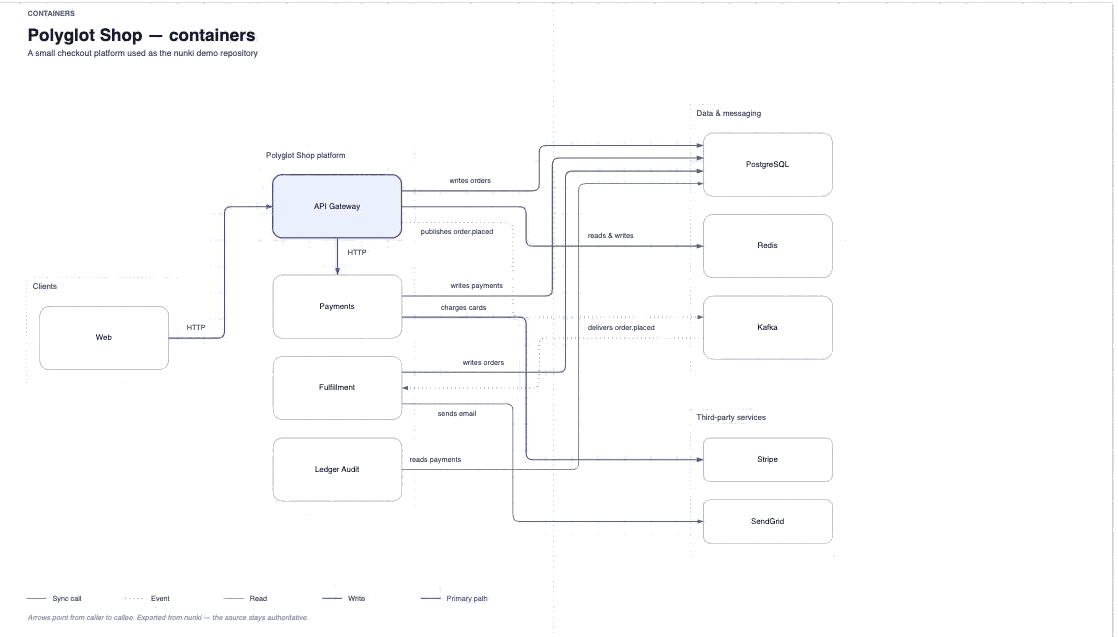
The boundaries, sizes, positions, edge routes and label placements are the ones nunki worked out
for the book, so the diagram opens looking like the figure it came from rather than a knot for
draw.io to untangle. Every shape carries its file:line as shape data (right-click →
Edit Data) and links to the line it came from, so a diagram pasted into a slide can still be
checked.
One way, deliberately: reading a drawing back would mean deciding whether the file or the source is right about the architecture, and the source is. The drawing is yours.
Keep it honest in CI
check exits non-zero when the book is out of date or cites code that has moved, which
is the point: documentation that is wrong should fail the build rather than mislead a reader.
nunki check /path/to/your/repo --out docs/architectureCommit the book alongside the code it documents, and run the check on every push:
- uses: sadaramk/nunki@v0.6.0
  with:
    out: docs/architecture
Committing the book does not invalidate it, and neither does a commit that changes nothing it
describes: a book records the commit it documents rather than HEAD. The check goes red
when the code it cites moves, and green again once the book is regenerated.
Review what a change does
check answers "is the documentation still true?". A pull request asks a different
question — what does this change? — and two rendered books do not answer it: they diff as text, so
a reordered table reads as a change and one new route reads as five.
nunki diff . --base origin/main
diff reads both revisions in throwaway worktrees, so it never touches your working
tree, and compares the models rather than the pages:
API operations
- added payments GET /charges/{id}
- changed api-gateway POST /checkout — response gains
trackingUrl; success status201→202; no authentication requirement is recognised any more
Services, connections, routes, request and response shapes, authentication, tables and columns.
comment: true posts it on the pull request — one comment, edited in place on every
push rather than appended to, and removed again if a later push makes the branch match its base,
so an unchanged architecture says nothing at all:
permissions:
  contents: read
  pull-requests: write

steps:
  - uses: actions/checkout@v7
    with:
      fetch-depth: 0
  - uses: sadaramk/nunki@v0.6.0
    with:
      command: diff
comment: trueCitations are pinned to a commit and verified against it. A citation whose lines have changed is reported as stale; one whose file has gone is broken. The book states its own coverage on the evidence page rather than presenting every claim as equally certain.
Edit a figure and keep the edit
Every figure is compiled from an IR file. Change a label, drop a node, mark a different focal point — regenerating will not undo it, as long as the IR still validates. That is the intended workflow: the tool drafts, you edit, the edit survives.
nunki validate docs/architecture/diagrams/containers.ir.json
nunki render docs/architecture/diagrams/containers.ir.json -o containers.html
Write the parts code cannot know
Business intent is not in the source. nunki marks it needs input instead of guessing,
and authored.json is where you supply it. Anything you write there is shown as
authored, kept apart from what was measured, and never overwritten by a later run.
Prose about code goes out of date too, so an operation's intent can carry
evidence: the lines it describes, written the way
nunki verify takes them. A pin becomes a citation like any other, verified against
the commit, and check reports it when it drifts.
"operations": {
  "api-gateway:POST /checkout": {
    "name": "Place an order",
    "actor": "Shopper",
    "purpose": "Take payment and start fulfilment.",
    "evidence": ["api-gateway/src/routes/checkout.ts:12-40"]
  }
}Let an agent drive it
nunki serve runs an MCP server on stdio, exposing scan, compile and verify. An agent
drafts an IR, has it rejected with JSON Patch diagnostics naming exactly what to fix, and retries —
it never emits SVG itself.
nunki serve